Salon d’accompagnement des débutants
-
steph37
- Messages : 5023
- Inscription : 14 avr. 2021, 11:03
- Localisation : Chenonceaux
Message
par steph37 » 14 oct. 2022, 12:25
bin reboote aussi le PC, on y verra plus clair j'espère

bon appetit !
steph37
-
lordzurp
- Messages : 1428
- Inscription : 25 juin 2020, 19:08
- Localisation : à l'ouest
Message
par lordzurp » 14 oct. 2022, 12:37
3 pages en moins de 12h ?! WTF ?
lordzurp
-
Marcus26
- Messages : 235
- Inscription : 17 sept. 2022, 14:18
- Localisation : Die
Message
par Marcus26 » 14 oct. 2022, 12:44
WTF ?
Marcus26
-
lordzurp
- Messages : 1428
- Inscription : 25 juin 2020, 19:08
- Localisation : à l'ouest
Message
par lordzurp » 14 oct. 2022, 12:57
WTF ! tu connais pas WTF ?
lordzurp
-
steph37
- Messages : 5023
- Inscription : 14 avr. 2021, 11:03
- Localisation : Chenonceaux
Message
par steph37 » 14 oct. 2022, 13:09
Ah bin
@lordzurp bienvenue à bord !

steph37
-
steph37
- Messages : 5023
- Inscription : 14 avr. 2021, 11:03
- Localisation : Chenonceaux
Message
par steph37 » 14 oct. 2022, 13:10
Suggestion pour
@Marcus26
tu rebootes le PC, tu lances Nina et rien d'autre et tu nous dis ; si tu peux publier le log c'est chouette

steph37
-
spica2000
- Messages : 4302
- Inscription : 06 févr. 2021, 14:59
- Localisation : 74
Message
par spica2000 » 14 oct. 2022, 13:14
voilà pourquoi j'aime tant les ordinateurs.
Ca fait pas avancer le schmilblick (désolé) mais ça défoule!
spica2000
-
steph37
- Messages : 5023
- Inscription : 14 avr. 2021, 11:03
- Localisation : Chenonceaux
Message
par steph37 » 14 oct. 2022, 13:20
Ah bin écoute oui @spica2000 ça peut agacer ou intéresser ... comme une énigme à résoudre
steph37
-
steph37
- Messages : 5023
- Inscription : 14 avr. 2021, 11:03
- Localisation : Chenonceaux
Message
par steph37 » 14 oct. 2022, 13:23
Le bouton "serveur activé" ça sert à lancer un serveur REST, je ne sais pas ce que c'est mais ça ne semble pas très utilisé. ca n'a probablement aucun rapport avec notre souci
@Marcus26 est-ce que tu as chargé Nina de gérer d'autres matériels que ton télescope et ta camera ou APN ?
steph37
-
Marcus26
- Messages : 235
- Inscription : 17 sept. 2022, 14:18
- Localisation : Die
Message
par Marcus26 » 14 oct. 2022, 13:43
Alors déjà, quelle rigolade !!!! Quand on y connais rien...
Alors oui, PHD2...
Marcus26
-
steph37
- Messages : 5023
- Inscription : 14 avr. 2021, 11:03
- Localisation : Chenonceaux
Message
par steph37 » 14 oct. 2022, 13:48
Ok merci
Si tu rebootes le PC, que tu lances juste Nina, qu'est ce que tu as comme log ?
steph37
-
Marcus26
- Messages : 235
- Inscription : 17 sept. 2022, 14:18
- Localisation : Die
Message
par Marcus26 » 14 oct. 2022, 14:05
----------------------------------------------------------------------
----------------NINA - Nighttime Imaging 'N' Astronomy----------------
-------------------Running NINA Version 2.0.2.9001--------------------
-------------------------2022-10-14T14:04:11--------------------------
---------------------.NET Version 4.0.30319.42000---------------------
---------------------Oparating System Information---------------------
---------------------------Is 64bit OS True---------------------------
------------------------Is 64bit Process True-------------------------
---------------------------Platform Win32NT---------------------------
--------------Version Microsoft Windows NT 10.0.22621.0---------------
---------------------------Major 10 Minor 0---------------------------
----------------------------Service Pack -----------------------------
----------------------------------------------------------------------
DATE|LEVEL|SOURCE|MEMBER|LINE|MESSAGE
2022-10-14T14:04:12.1767|INFO|CameraChooserVM.cs|GetEquipment|71|Found 0 ASI Cameras
2022-10-14T14:04:12.2180|INFO|CameraChooserVM.cs|GetEquipment|86|Found 0 Altair Cameras
2022-10-14T14:04:12.2893|DEBUG|FLIFilterWheels.cs|GetFilterWheels|28|FLI: Found 0 filter wheel(s)
2022-10-14T14:04:12.3839|DEBUG|DllLoader.cs|LoadDll|568|Successfully loaded C:\Program Files\N.I.N.A. - Nighttime Imaging 'N' Astronomy\External\x64\FTDI\ftd2xx.dll
2022-10-14T14:04:12.3839|DEBUG|DllLoader.cs|LoadDll|568|Successfully loaded C:\Program Files\N.I.N.A. - Nighttime Imaging 'N' Astronomy\External\x64\MGEN\MG3lib.dll
2022-10-14T14:04:12.4466|ERROR|CompositionRoot.cs|Compose|53
System.Exception: Cannot initialize Canon SDK. EOS Utiltiy is preventing the DLL to load. Please close EOS Utility first to be able to connect to your Canon Camera!
à EDSDKLib.EDSDKLocal.Initialize() dans E:\Projects\nina\NINA.Equipment\SDK\CameraSDKs\EDSDK\EDSDKLocal.cs:ligne 39
à NINA.CompositionRoot.Compose(IProfileService profileService) dans E:\Projects\nina\NINA\CompositionRoot.cs:ligne 51
2022-10-14T14:04:12.4935|INFO|CameraChooserVM.cs|GetEquipment|98|Found 0 Atik Cameras
2022-10-14T14:04:12.4935|DEBUG|FLICameras.cs|GetCameras|28|FLI: Found 0 camera(s)
2022-10-14T14:04:12.4935|INFO|CameraChooserVM.cs|GetEquipment|112|Found 0 FLI Cameras
2022-10-14T14:04:13.5157|INFO|CameraChooserVM.cs|GetEquipment|132|Found 0 QHYCCD Cameras
2022-10-14T14:04:13.5157|DEBUG|QHYFilterWheels.cs|GetFilterWheels|62|QHYCFW: Found 0 filter wheel(s)
2022-10-14T14:04:13.5470|INFO|CameraChooserVM.cs|GetEquipment|160|Found 0 ToupTek Cameras
2022-10-14T14:04:13.5470|INFO|CameraChooserVM.cs|GetEquipment|172|Found 0 Omegon Cameras
2022-10-14T14:04:13.5943|INFO|CameraChooserVM.cs|GetEquipment|184|Found 0 RisingCam Cameras
2022-10-14T14:04:13.5943|INFO|CameraChooserVM.cs|GetEquipment|196|Found 0 MallinCam Cameras
2022-10-14T14:04:13.5943|DEBUG|SBIGCameraProvider.cs|GetEquipment|45|Getting SBIG Cameras
2022-10-14T14:04:13.6259|DEBUG|SBIGFilterWheelProvider.cs|GetEquipment|40|Getting SBIG Filter Wheels
2022-10-14T14:04:13.6259|INFO|CameraChooserVM.cs|GetEquipment|219|Found 0 SBIG Cameras
2022-10-14T14:04:15.0246|INFO|ApplicationVM.cs|CheckASCOMPlatformVersion|78|ASCOM Platform 6.6.1.3673 installed
2022-10-14T14:04:15.1897|DEBUG|SVBonyProvider.cs|GetEquipment|49|Getting SVBony Cameras
2022-10-14T14:04:15.1927|INFO|CameraChooserVM.cs|GetEquipment|239|Found 0 SVBony Cameras
2022-10-14T14:04:15.1937|DEBUG|PlayerOneProvider.cs|GetEquipment|47|Getting Player One cameras
2022-10-14T14:04:15.1947|INFO|CameraChooserVM.cs|GetEquipment|239|Found 0 PlayerOne Cameras
2022-10-14T14:04:15.1957|DEBUG|ASTPANProvider.cs|GetEquipment|37|Getting ASTPAN Cameras
2022-10-14T14:04:15.1987|INFO|CameraChooserVM.cs|GetEquipment|239|Found 0 ASTPAN Cameras
2022-10-14T14:04:15.2209|INFO|CameraChooserVM.cs|GetEquipment|252|Found 3 ASCOM Cameras
Marcus26
-
Marcus26
- Messages : 235
- Inscription : 17 sept. 2022, 14:18
- Localisation : Die
Message
par Marcus26 » 14 oct. 2022, 14:06
Voila, avec le même message concernant EOS utility alors que le Canon n'est même pas câblé sur l'ordinateur...
Marcus26
-
steph37
- Messages : 5023
- Inscription : 14 avr. 2021, 11:03
- Localisation : Chenonceaux
Message
par steph37 » 14 oct. 2022, 14:15
ok et là tu as eu la fameuse fenêtre en bas à gauche, celle que tu avais mise dans ton premier message ?
steph37
-
steph37
- Messages : 5023
- Inscription : 14 avr. 2021, 11:03
- Localisation : Chenonceaux
Message
par steph37 » 14 oct. 2022, 14:19
non en bas à droite la fenêtre

steph37
-
Marcus26
- Messages : 235
- Inscription : 17 sept. 2022, 14:18
- Localisation : Die
Message
par Marcus26 » 14 oct. 2022, 14:20
J'ai la fenetre que si je met le serveur activé sur ON
Marcus26
-
Marcus26
- Messages : 235
- Inscription : 17 sept. 2022, 14:18
- Localisation : Die
Message
par Marcus26 » 14 oct. 2022, 14:23
Et plus moyen de connecter le Canon...
Marcus26
-
steph37
- Messages : 5023
- Inscription : 14 avr. 2021, 11:03
- Localisation : Chenonceaux
Message
par steph37 » 14 oct. 2022, 14:27
Marcus26 a écrit : ↑14 oct. 2022, 14:20
J'ai la fenetre que si je met le serveur activé sur ON
ah bin on progresse
steph37
-
steph37
- Messages : 5023
- Inscription : 14 avr. 2021, 11:03
- Localisation : Chenonceaux
Message
par steph37 » 14 oct. 2022, 14:30
Marcus26 a écrit : ↑14 oct. 2022, 14:23
Et plus moyen de connecter le Canon...
Proposition :
tu désinstalles tous les outils Canon que tu as installés
tu rebootes
tu réinstalles les outils Canon
tu réessaies de lancer Nina et de connecter le Canon
steph37
-
Marcus26
- Messages : 235
- Inscription : 17 sept. 2022, 14:18
- Localisation : Die
Message
par Marcus26 » 14 oct. 2022, 14:40
OK...
Marcus26
-
Marcus26
- Messages : 235
- Inscription : 17 sept. 2022, 14:18
- Localisation : Die
Message
par Marcus26 » 14 oct. 2022, 14:56
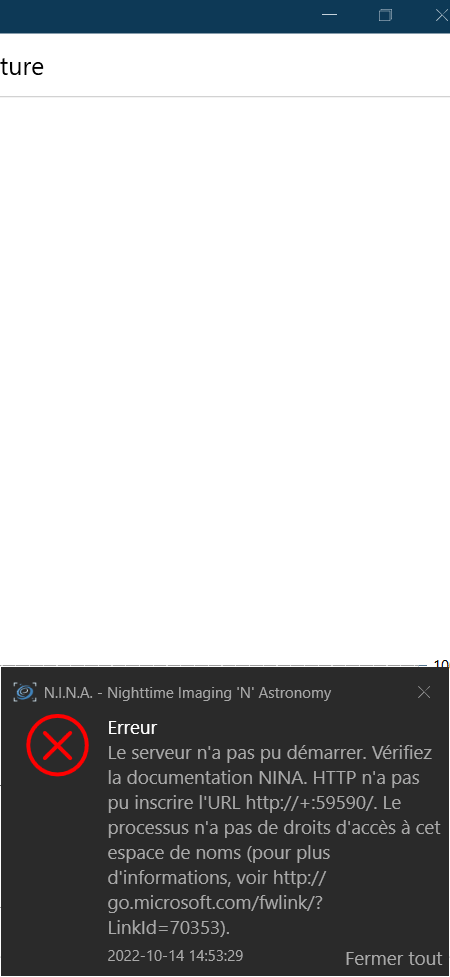
C'est fait, la le canon s'affiche...
Je vais essayer de connecter mon Meade...
-
Pièces jointes
-
- image.png (34.25 Kio) Consulté 1586 fois
Marcus26
-
steph37
- Messages : 5023
- Inscription : 14 avr. 2021, 11:03
- Localisation : Chenonceaux
Message
par steph37 » 14 oct. 2022, 14:59
@Marcus26 je pige pas pourquoi la fenêtre d'erreur en bas à droite est revenue.
Est-ce que tu as activé le serveur dans "configuration avancée ?" (si oui je crois qu'il ne faut pas l'activer)
steph37
-
Marcus26
- Messages : 235
- Inscription : 17 sept. 2022, 14:18
- Localisation : Die
Message
par Marcus26 » 14 oct. 2022, 15:12
Marcus26
-
Marcus26
- Messages : 235
- Inscription : 17 sept. 2022, 14:18
- Localisation : Die
Message
par Marcus26 » 14 oct. 2022, 15:12
Rien ne change...

Marcus26
-
steph37
- Messages : 5023
- Inscription : 14 avr. 2021, 11:03
- Localisation : Chenonceaux
Message
par steph37 » 14 oct. 2022, 15:14
Bin envoie donc le contenu du log
steph37